I’m working on a student project where we want to simulate temperature, humidity, and airflow inside a solar dryer using SimScale, to compare different design setups (e.g. passive ventilation, turbine roof ventilator, thermal flooring).
I modeled the dryer as follows:
Rectangular solids representing the walls, roof, and floor, each with a finite thickness to allow conjugate heat transfer
A cylinder in the roof representing a turbine (whirlybird) ventilator
One large box enclosing the interior, intended to be converted into the fluid region using Internal flow volume
However, when I try to create the internal flow volume, I get the following error:
Invalid Seed face
The Seed face face 2@Box touches at least two different potential flow volumes.
Please select a Seed face that is unique to the desired void region.
I’m struggling to understand how to define a valid seed face here, and I can’t seem to fix the geometry in a way that SimScale accepts. I suspect I may be unintentionally creating multiple connected voids or overlapping volumes, but I’m not sure how to diagnose or resolve this.
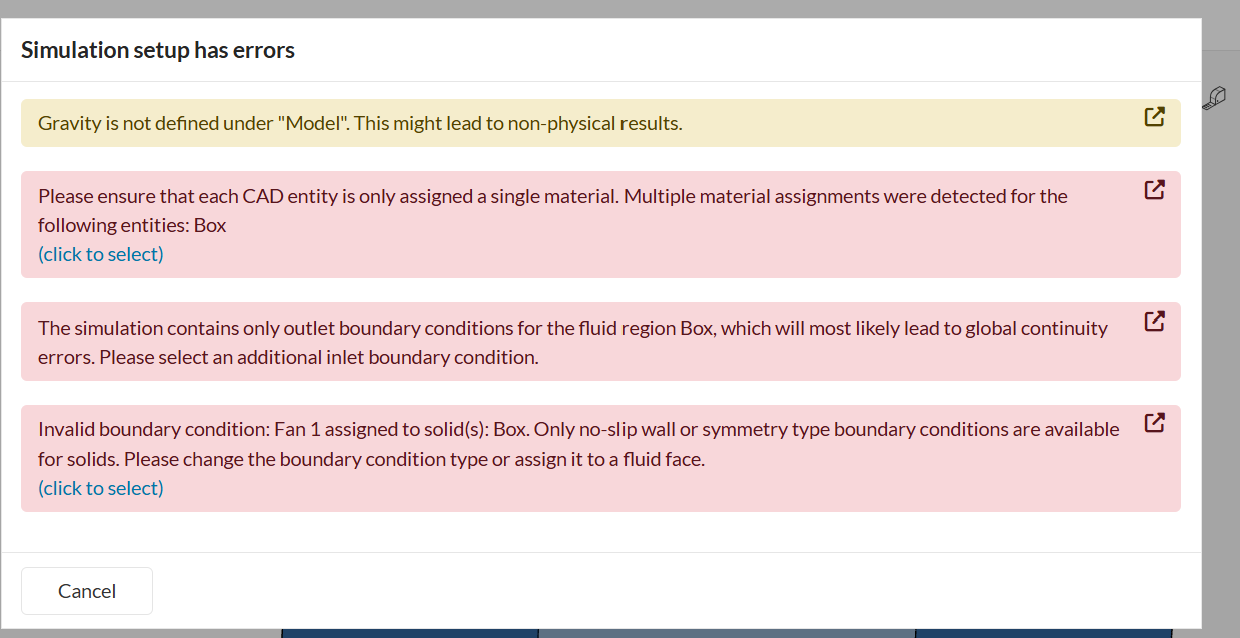
I also tried simplifying the model by using one solid box for the entire dryer, but that leads to other setup errors (see screenshot).
Thanks for your detailed question, and welcome to the SimScale forum! Your student project on a solar dryer sounds like a fantastic application for a Conjugate Heat Transfer (CHT) simulation. Your modeling approach is on the right track, and the “Invalid Seed face” error you’re encountering is a common hurdle when setting up internal flow simulations. Let’s get it sorted out.
Understanding the “Invalid Seed Face” Error
You’re correct in your suspicion. This error message means that SimScale cannot define a single, sealed internal fluid volume starting from your selected seed face. The algorithm is finding “leaks” or ambiguities in the geometry. This usually happens if:
There are small, unintentional gaps between the solid bodies (walls, roof, floor).
The solid bodies overlap with each other.
The seed face you selected touches more than one potential enclosed volume.
How to Correctly Structure Your Geometry
For a CHT simulation, the best practice is to prepare a multi-body CAD model where the solid parts and the fluid region are distinct, non-overlapping bodies that share faces perfectly. The goal is to have a “watertight” enclosure that defines your internal fluid region.
Here is the most robust approach, which avoids the flow volume extraction tool altogether:
Model the Fluid Volume Directly: In your CAD software, model the internal air volume as a distinct solid body. This body should perfectly fill the inside of your solar dryer.
Model the Solid Parts: Model the walls, roof, and floor as separate solid bodies that surround this fluid volume. Ensure their surfaces touch the fluid volume’s surfaces perfectly, with no gaps or overlaps.
Import as a Multi-Body Assembly: Import the complete model into SimScale. You will see multiple parts in your geometry tree (e.g., “Fluid Volume,” “Walls,” “Floor,” etc.).
Assign Materials: In the simulation setup, simply assign “Air” as the material to your fluid body and the appropriate solid materials to the dryer components.
This method gives you full control and bypasses the errors associated with automatic flow volume extraction.
If you prefer to use the Internal flow volume tool, you must first ensure your solid enclosure is perfectly sealed. Run an interference or gap check in your CAD tool to find and fix any leaks before uploading to SimScale. Once sealed, the tool should work as expected. You may also need the Imprint operation to ensure the faces between the solids and the extracted fluid volume are correctly joined for heat transfer.
Answering Your Questions
How to correctly structure the geometry?
Use a multi-body CAD model where fluid and solid parts are separate, non-overlapping bodies that touch perfectly.
How to make a valid internal flow volume?
The enclosing solid geometry must be perfectly “watertight” with no gaps, leaks, or overlaps. Modeling the fluid volume directly in CAD is the most reliable method.
Is my modeling approach reasonable?
Absolutely. Using a CHT analysis to simulate temperature, humidity, and airflow with natural ventilation in a solar dryer is the correct and an excellent approach.
For more detailed guidance on setting up your simulation, I highly recommend reviewing these resources: